Free Excel invoice template
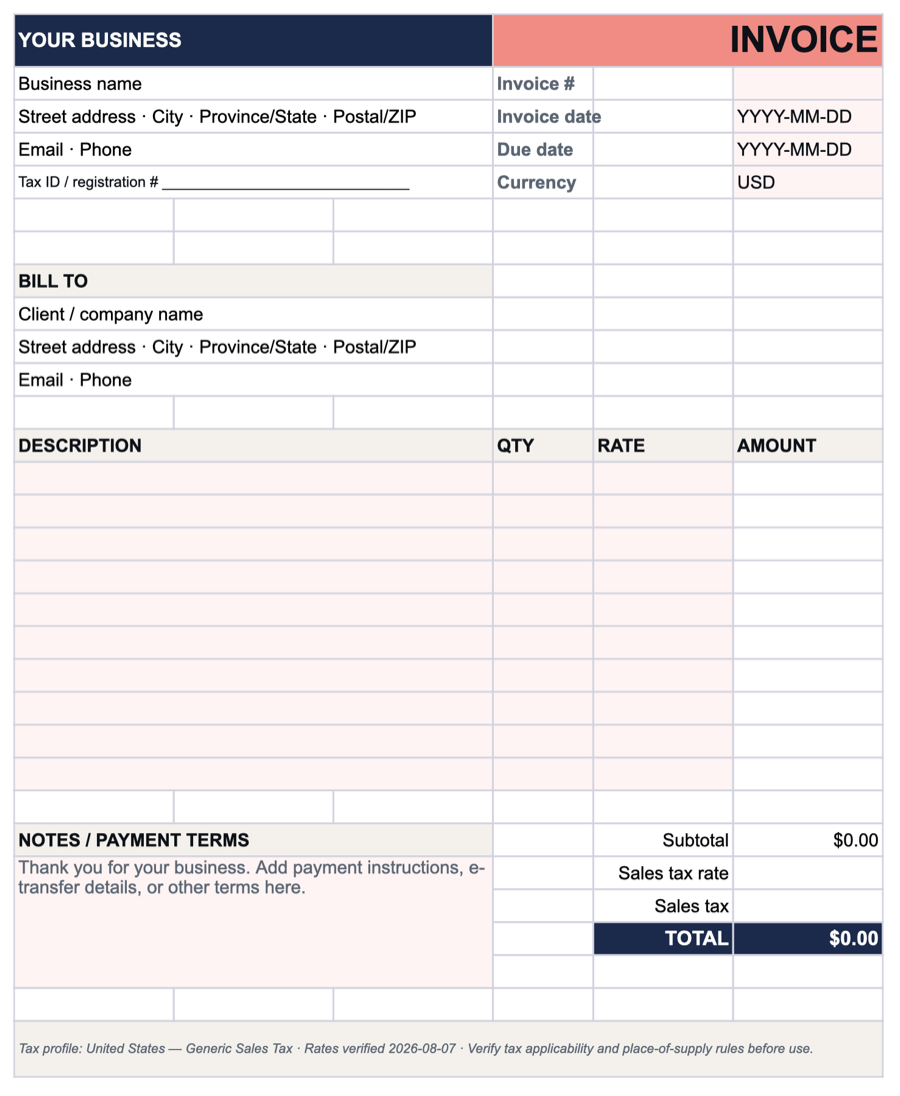
A spreadsheet invoice that does the arithmetic. Enter a quantity and a rate, and Excel works out each line, the subtotal, the sales tax and the total. You enter the sales-tax rate yourself, because it depends on the state and locality.
Your template is downloading.
A template works. A real invoice is faster: InvoiceCast fills in your details, adds the tax, numbers each invoice and emails it to your client.
What the spreadsheet does for you
- Calculates as you type. Each line amount is quantity × rate. The subtotal, every tax line and the total update on their own, with no formulas to write.
- A sales-tax line you control. Type your rate into the sales-tax cell and the tax and total follow. Leave it blank and no tax is added.
- Printable and PDF-ready. Print it straight from Excel, or save it as a PDF to email to your client.
- Fully editable. Change the labels and colours, or add your logo. It is an ordinary .xlsx file with no macros.
Download the Excel invoice template
One file for any state. Rates, nexus rules and taxability vary by state and locality, so the rate is left for you to enter.
-
Download: United States — Generic Sales Tax (Excel)
Want this saved to an account instead?
Create a free InvoiceCast account and skip re-editing this template every time — invoices, taxes, and totals are calculated automatically.
Sign up and save →
Excel invoice template: common questions
Should I use the Word or the Excel invoice template? ▾
Use Excel if you want the figures done for you: the spreadsheet multiplies each line, adds up the subtotal, calculates each tax and totals the invoice. The Word template has the same layout but does not calculate, so you type every amount yourself. It suits short invoices, or anyone who simply prefers a document editor.
Can I add my logo and business details? ▾
Yes. Type your business name, address and tax ID into the cells at the top, then insert your logo with Insert → Pictures and place it over the "YOUR BUSINESS" header. You can change the fill colors to match your brand. Save the result as your own copy so the next invoice starts from it.
Can I use one template for several clients? ▾
Yes. Keep a master copy with your own details filled in and the client and line items left blank. For each invoice, save a copy under the client's name and the invoice number, then fill it in. Number your invoices in one running sequence across all clients, so every invoice number is unique.
How do I turn the Excel invoice into a PDF? ▾
In Excel, choose File → Save As (or File → Export) and pick PDF. On a Mac you can also use File → Print → Save as PDF. Check the print preview first so the invoice fits on one page, and send your client the PDF rather than the spreadsheet so the figures cannot be changed.
How is sales tax calculated in the template? ▾
The tax line is the pre-tax subtotal multiplied by the rate you type into the sales-tax cell, and the total is the subtotal plus that tax. For example, $1,000 of work at a 7.25% rate is $72.50 in tax and $1,072.50 in total. Which rate applies, and whether the sale is taxable at all, depends on where the sale is sourced, so check with the state's revenue department.
Can I change the tax rate in the spreadsheet? ▾
Yes. The rate sits in its own cell next to "Sales tax" on the invoice, so you can set it for each invoice: type it as a percentage, such as 7.25%. Leave the cell empty for a sale that carries no sales tax.
These templates are a convenience, not tax or legal advice. Whether sales tax applies, and at what rate, depends on what you sell and where the sale is sourced.
Rather not fill in a template at all?
The free invoice generator builds a PDF invoice with the sales tax worked out, in your browser. Or create a free InvoiceCast account to save your clients and email invoices straight from it.
Use the free invoice generator → Create a free account